
使用apt包管理器安装vsftp
apt install -y vsftpd
Reading package lists... Done
Building dependency tree... Done
Reading state information... Done
vsftpd is already the newest version (3.0.5-0ubuntu3.1).
0 upgraded, 0 newly installed, 0 to remove and 66 not upgraded.
创建共享用户
设置用户密码
创建用户目录
设置目录权限
root@hySer:~# useradd  -m -d /mnt/ftpuser  -s  /usr/sbin/nologin ftpuser
root@hySer:~# passwd ftpuser
New password:
Retype new password:
passwd: password updated successfully
root@hySer:~# mkdir -p /mnt/ftpuser/upload
root@hySer:~# chown ftpuser:ftpuser /mnt/ftpuser/upload/
编辑配置文件,之后要把nologin添加到安全shell里面
cat /etc/vsftpd.conf | grep -Ev "^#"
listen=NO
#不启用 IPv4 独立监听(由 listen_ipv6 接管,同时兼容 IPv4)
listen_ipv6=YES
#启用 IPv6 独立监听。vsftpd 监听 :: 时会同时接受 IPv6 和 IPv4 连接(IPv4 以 ::ffff:x.x.x.x 形式出现,你日志里的客户端地址正是这种格式)。
anonymous_enable=NO
#禁止匿名用户登录,必须用系统用户认证。
local_enable=YES
#允许本地系统用户登录 FTP(你的 ftpuser 就属于这类)。
write_enable=YES
#允许任何形式的写操作(上传、删除、改名、建目录等)。这是全局总开关。
dirmessage_enable=YES
#进入某个目录时,如果该目录下有 .message 文件,就把它显示给用户。
use_localtime=YES
#目录列表显示的时间用服务器本地时区,而不是 GMT。
xferlog_enable=YES
#启用上传/下载日志记录(默认写到 /var/log/vsftpd.log)。
connect_from_port_20=YES
#主动模式下,数据连接从 20 端口(ftp-data)发起。
chroot_local_user=YES
#把所有本地用户限制在其主目录内,不能 cd 到上级目录。
secure_chroot_dir=/var/run/vsftpd/empty
#指定一个空目录,vsftpd 在不需要文件系统访问时,把这里当作安全的 chroot 牢笼。该目录必须为空,且不能对 ftp 用户可写。
pam_service_name=vsftpd
#指定使用 PAM 服务名 vsftpd,即读取 /etc/pam.d/vsftpd 做认证。
rsa_cert_file=/etc/ssl/certs/ssl-cert-snakeoil.pem
rsa_private_key_file=/etc/ssl/private/ssl-cert-snakeoil.key
ssl_enable=NO
#指定 SSL 证书和私钥路径,但当前 ssl_enable=NO,所以这两行暂时不生效。将来要开 FTPS 才需要。
local_root=/mnt/ftpuser/
#设置共享目录
allow_writeable_chroot=YES
允许 chroot 的根目录对用户可写。不加这行时,如果 local_root 对 ftpuser 可写,vsftpd 会拒绝登录并报 500 OOPS: vsftpd: refusing to run with writable root inside chroot()。加上它即可绕过该限制。
添加安全shell
echo "/usr/sbin/nologin" | sudo tee -a /etc/shells
#查看一下
root@hySer:~# grep nologin /etc/shells
/usr/sbin/nologin
root@hySer:~#
使用systemctl重启vsftp,查看vsftp的状态
root@hySer:~# systemctl restart vsftpd.service
root@hySer:~# systemctl status vsftpd.service
● vsftpd.service - vsftpd FTP server
     Loaded: loaded (/usr/lib/systemd/system/vsftpd.service; enabled; preset: enabled)
     Active: active (running) since Fri 2026-10-02 12:01:49 CST; 8s ago
    Process: 2666 ExecStartPre=/bin/mkdir -p /var/run/vsftpd/empty (code=exited, status=0/SUCCESS)
   Main PID: 2667 (vsftpd)
      Tasks: 1 (limit: 7012)
     Memory: 712.0K (peak: 1.6M)
        CPU: 4ms
     CGroup: /system.slice/vsftpd.service
             └─2667 /usr/sbin/vsftpd /etc/vsftpd.conf

Oct 02 12:01:49 hySer systemd[1]: vsftpd.service: Deactivated successfully.
Oct 02 12:01:49 hySer systemd[1]: Stopped vsftpd.service - vsftpd FTP server.
Oct 02 12:01:49 hySer systemd[1]: Starting vsftpd.service - vsftpd FTP server...
Oct 02 12:01:49 hySer systemd[1]: Started vsftpd.service - vsftpd FTP server.
关闭ufw防火墙,查看状态
root@hySer:~# ufw disable
Firewall stopped and disabled on system startup
root@hySer:~# ufw status
Status: inactive
root@hySer:~#
我用的是manjaro linux所以要安装gvfs这个包,windows是不需要的
sudo pacman -S gvfs
[sudo] lhy 的密码:
警告:gvfs-1.60.2-4 已经为最新 -- 重新安装
正在解析依赖关系...
正在查找软件包冲突...

软件包 (1) gvfs-1.60.2-4

全部安装大小:  5.26 MiB
净更新大小:    0.00 MiB

:: 进行安装吗? [Y/n] y
(1/1) 正在检查密钥环里的密钥                                                              [####################################################] 100%
(1/1) 正在检查软件包完整性                                                                [####################################################] 100%
(1/1) 正在加载软件包文件                                                                  [####################################################] 100%
(1/1) 正在检查文件冲突                                                                    [####################################################] 100%
(1/1) 正在检查可用存储空间                                                                [####################################################] 100%
:: 正在运行事务前钩子函数...
(1/1) Creating Timeshift snapshot before upgrade...
==> Skipping timeshift-autosnap because only 3 hours have passed since the last snapshot.
:: 正在处理软件包的变化...
(1/1) 正在重新安装 gvfs                                                                   [####################################################] 100%
:: 正在运行事务后钩子函数...
(1/6) Creating temporary files...
(2/6) Reloading user manager configuration...
(3/6) Arming ConditionNeedsUpdate...
(4/6) Updating GIO module cache...
(5/6) Compiling GSettings XML schema files...
(6/6) Reloading GVFS config...
可以使用命令行的方法进行访问
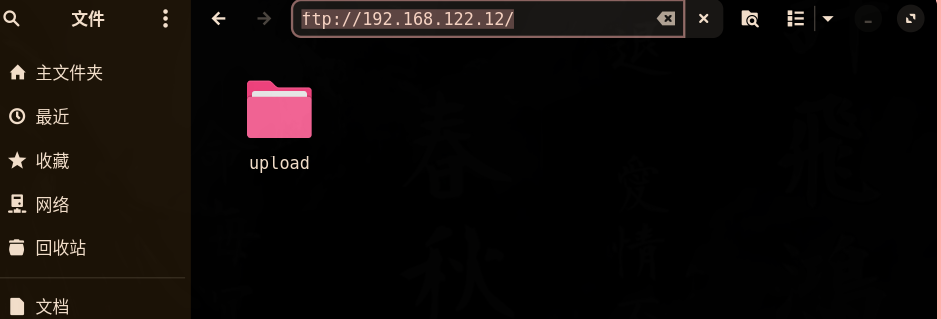
也可以使用nautilus文件管理器进行访问
#命令行的方法
 ftp ftpuser@192.168.122.12
Connected to 192.168.122.12.
220 (vsFTPd 3.0.5)
331 Please specify the password.
Password:
230 Login successful.
Remote system type is UNIX.
Using binary mode to transfer files.
ftp> ls upload
200 PORT command successful. Consider using PASV.
150 Here comes the directory listing.
-rw-r--r--    1 1001     1001           23 Oct 02 11:43 go.mod
226 Directory send OK.

评论区